Flask CI/CD Dual Environment Deployment
Overview
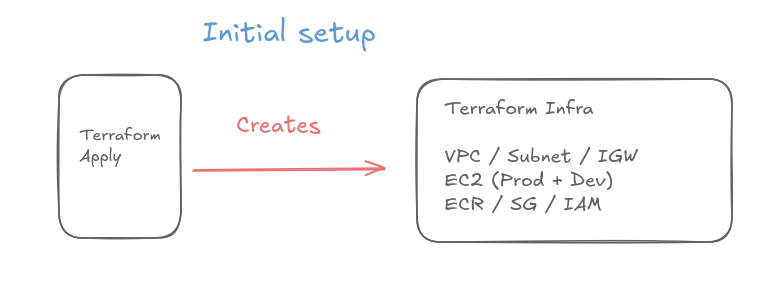
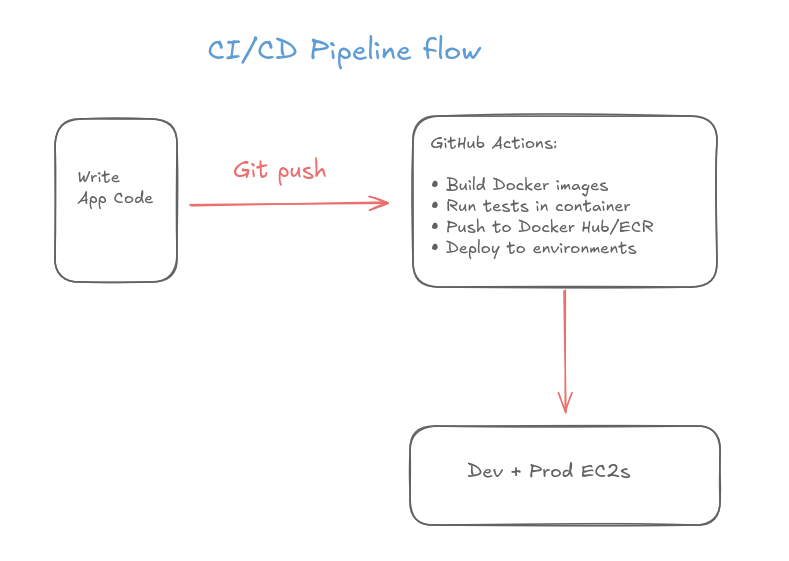
I built a complete CI/CD pipeline demonstrating automated Docker containerization and multi-environment deployment to AWS using GitHub Actions.
You can find the code files in this GITHUB REPO. To run it you will need:
- Terraform installed
- Docker installed locally
- GitHub account
- AWS CLI configured
Check out the project's readme file for instructions on how to download it and run it on your machine
Architecture
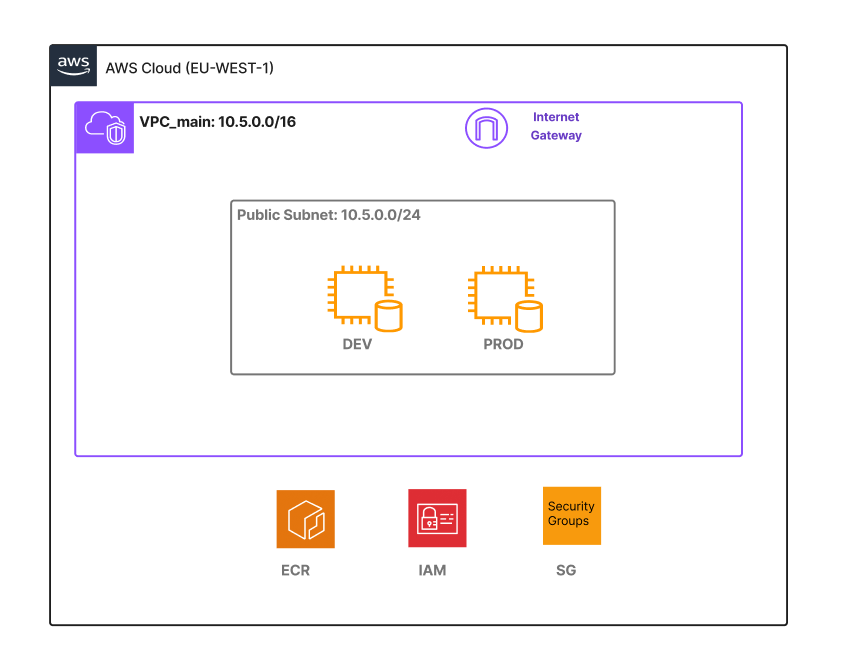
Network Topology components
- 1 Region: EU-WEST-1 (Ireland)
- 1 VPC
- 1 subnet
- 1 Route Table
- IGW
- 1 Security Group
- 2 x ec2 (Prod and Dev)
- ECR
- IAM
Code Snippets
Dockerfile
FROM python:3.11-slim
WORKDIR /app
COPY requirements.txt ./
RUN pip install -r requirements.txt
COPY app.py .
COPY templates/ ./templates/
COPY static/ ./static/
CMD ["python", "app.py"]
Github Actions
- name: Deploy to PROD
    env:
        REGISTRY: ${{ steps.login-ecr.outputs.registry }}
        REPOSITORY: flask-cicd-dual-env-deploy
    run: |
        echo "${{ secrets.EC2_SSH_PRIVATE_KEY }}" > private_key.pem
        chmod 600 private_key.pem
        ssh -o StrictHostKeyChecking=no -i private_key.pem ubuntu@${{ secrets.PROD_EC2_IP }} "
          aws ecr get-login-password --region eu-west-1 | docker login --username AWS --password-stdin $REGISTRY
          docker pull $REGISTRY/$REPOSITORY:latest
          docker stop flask-prod || true
          docker rm flask-prod || true
          docker run -d -p 5000:5000 -e ENVIRONMENT=PROD --name flask-prod $REGISTRY/$REPOSITORY:latest
        "
        rm -f private_key.pem
Terraform IAM
resource "aws_iam_role" "ec2_role" {
  name = "ec2_ecr_role"

  assume_role_policy = jsonencode({
    Version = "2012-10-17"
    Statement = [{
      Effect = "Allow"
      Principal = {
        Service = "ec2.amazonaws.com"
      }
      Action = "sts:AssumeRole"
    }]
  })
}
Challenges & Key Takeaways
WORKFLOW SEQUENCING: A critical learning point was understanding the distinction between one-time infrastructure provisioning and continuous deployment automation. Initially, I assumed GitHub Actions would handle everything end-to-end, but I learned that Terraform creates the foundation once (VPC, EC2 instances, ECR repository, security groups), while GitHub Actions handles the repetitive deployment cycle triggered on every git push. Each GitHub Actions step must execute in precise order: checkout code, configure AWS credentials, login to ECR, build the Docker image, run tests, push to ECR, then finally deploy to both environments. Understanding this sequential dependency—where later steps rely on outputs from earlier ones, such as using the ECR registry URL from the login step—was essential for building a reliable pipeline.
WORKFLOW SEQUENCING: A critical learning point was understanding the distinction between one-time infrastructure provisioning and continuous deployment automation. Initially, I assumed GitHub Actions would handle everything end-to-end, but I learned that Terraform creates the foundation once (VPC, EC2 instances, ECR repository, security groups), while GitHub Actions handles the repetitive deployment cycle triggered on every git push. Each GitHub Actions step must execute in precise order: checkout code, configure AWS credentials, login to ECR, build the Docker image, run tests, push to ECR, then finally deploy to both environments. Understanding this sequential dependency—where later steps rely on outputs from earlier ones, such as using the ECR registry URL from the login step—was essential for building a reliable pipeline.
CONTAINERIZATION CLARITY: Working with Docker revealed the importance of understanding the relationship between images and containers. A Docker image is a static blueprint built from the Dockerfile, while a container is a running instance of that image. This distinction became critical during deployments: GitHub Actions builds the image once and pushes it to ECR, but each EC2 instance pulls that same image and runs it as a separate container with different environment variables (DEV vs PROD). The deployment step needed logic to stop and remove existing containers before starting new ones, using '|| true' to handle cases where no previous container existed. This taught me that containerization isn't just about packaging an app—it's about managing the lifecycle of ephemeral, reproducible runtime environments.